Big Brother User Guide
Big Brother is a desktop app for Human Resources to manage employee contacts, optimized for use via typing in a Command Line Interface (CLI) command box, while displaying the contacts efficiently via a Graphical User Interface (GUI).
Quick start
Ensure you have Java
17installed in your Computer.
You may find instructions on how to do so for your operating system version here.
Mac users: Ensure you have the precise JDK version prescribed here.Download the latest
.jarfile from here.Copy the file to the folder you want to use as the home folder for Big Brother.
Open a command terminal (you can search for it in the start menu) and change the working folder to the one you put the app in. All operating systems support this with the
cdcommand:
Windowscd C:\Users\your_username\big_brother_home_folder
Linuxcd /home/your_username/big_brother_home_folder
Maccd /Users/your_username/big_brother_home_folderRun the
java -jar bigbrother.jarcommand to start the app.
Note the app name may be slightly different due to versions.
A GUI similar to the below should appear in a few seconds.
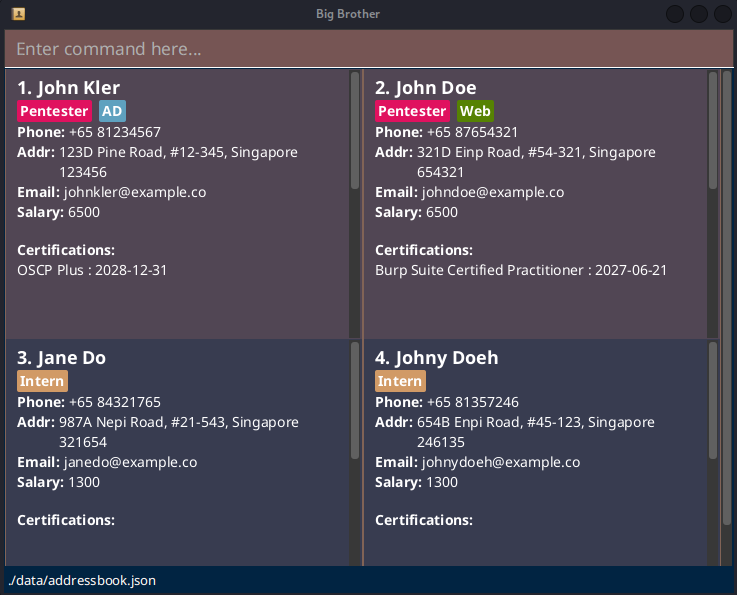
- Type a command in the command box (the red-brown rectangle at the top) and press Enter to execute it.
- Refer to the Features below for details of each command.
- Refer to the Input Validation, Duplicate Handling and Utilities below to determine valid inputs, duplication rules and app utilities to help with usage.
- Refer to the Summary below for a summary of all available commands.
Features
Notes about the command format:
Words in
UPPER_CASEare the parameters to be supplied by you.
e.g. forn/NAME,NAMEis the parameter.Arguments not in square brackets are compulsory.
e.g.n/NAME,INDEXArguments in square brackets are optional. More explanations will be provided where they appear.
e.g.[a/TAGS_TO_ADD],[d/TAGS_TO_DELETE]INDEXmust be a positive integer 1, 2, 3, ...Parameters can be in any order.
e.g. if the command specifiesn/NAME p/PHONE,p/PHONE n/NAMEis also acceptable.Multiple prefixes must be separated by whitespaces.
e.g. if the command specifiesn/NAME p/PHONE,n/NAMEp/PHONEis not acceptable.Prefix symbol and
/cannot be separated by whitespaces.
e.g. if the command specifiesn/NAME,n /NAMEis not acceptable.Extraneous parameters for commands that do not take in parameters (such as
help,list,exitandclear) will be ignored.
e.g. if you inputhelp 123, it will interpreted as justhelp.If you are using a PDF version of this document, be careful when copying and pasting commands that span multiple lines as space characters surrounding line-breaks may be omitted when copied over to the application.
Navigating the GUI
The GUI is structured such that the main contacts list is a big scrollable section, and the contact entries are smaller scollable sections.
You can hover your mouse cursor over the desired scroll bar, then scroll each section independently.
When you perform a command that modifies the contact list or a contact entry, all the contact entries will scroll to the top.
The main contact list does not have autoscroll, so you may need to scroll manually to see the changes after performing a command (e.g. after
add, the newly added contact is at the bottom).Mouseless-support is planned to be implemented in a future update.
Viewing in-app help menu : help
Format: help
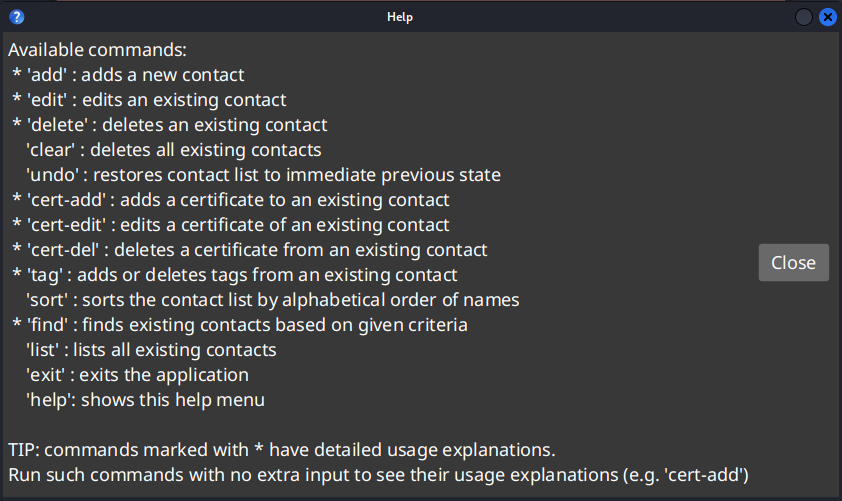
Tips for in-app help
You can automatically close the popups with Enter on Windows and Linux, or Spacebar on Mac.
If you need more help with a command marked by a
*, enter it with no arguments into the command box. Example: to get more help foradd, enteraddinto the command box.
Adding a new contact : add
Format: add n/NAME [p/PHONE] [e/EMAIL] [a/ADDRESS] [s/SALARY]
- all four of the optional fields may be omitted
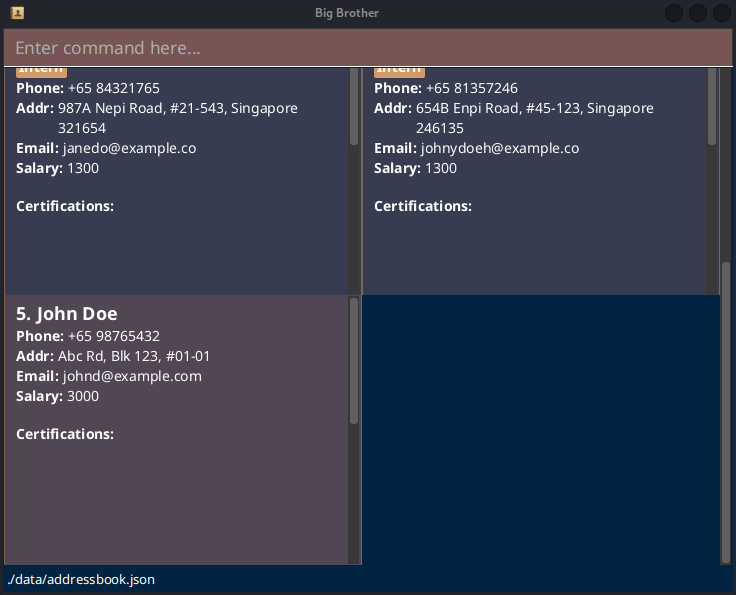
Example: add n/John Doe p/+65 98765432 e/johnd@example.com a/Abc Rd, Blk 123, #01-01 s/3000
Expected result (starting with the existing sample data):
Editing an existing contact : edit
Format: edit INDEX [n/NAME] [p/PHONE] [e/EMAIL] [a/ADDRESS] [s/SALARY]
- Edits the person at the specified
INDEXof the displayed person list. - At least one of the optional fields must be provided.
- Existing values will be updated to the input values.
- Inputting an empty value for a prefix would result in that value being deleted.
- Input values can be the same as existing values (e.g. if person with
INDEX2 already hasSALARYof3000, you can still performedit 2 s/3000)
Example: edit 1 p/+017 91234567 e/johndoe@example.com
- Edits the phone to
+017 91234567and the email tojohndoe@example.comfor the first person.
Tip on duplicate warning
If you
edita contact such that it now matches another existing contact in your list, Big Brother will perform the edit but will trigger a warning pop-up to alert you of the duplicate. You can choose to keep the duplicate or delete it later.
Deleting an existing contact : delete
Format: delete INDEX
- Deletes the person at the specified
INDEXof the displayed person list.
Examples:
listfollowed bydelete 2deletes the 2nd person in the address book.find n/Betsyfollowed bydelete 1deletes the 1st person in the results of thefindcommand, if present.
Searching contacts by criteria : find
Format: find [n/NAME] [t/TAG] [c/CERT_NAME] [e/CERT_EXPIRY_DATE]
- Finds persons based on the given criteria.
- At least one of the optional fields must be provided.
- For
NAME,TAGandCERT_NAME, the match is case-insensitive and can match part of the word.- e.g. 'john' will match 'Johny'
- For
CERT_EXPIRY_DATE, the match is for certificates that expire before the provided date. - A field can be used more than once to expand the search (i.e.
ORsearch), except forCERT_EXPIRY(see Ex 1).- Use repeated fields, not spaces, for
OR(i.e.find t/HR t/ITand notfind t/HR IT)
- Use repeated fields, not spaces, for
- Multiple fields can be used to narrow down the search (i.e
ANDsearch) (see Ex 3).
Examples:
find n/Alex Y n/Davidreturns all persons whose name containsAlex YorDavid.find c/OSCPreturns all persons with certificate names containingOSCP.find n/Alex t/IT e/2027-03-15returns all persons whose name containsAlex, with tags that containITand with certificates that expire before 15th March 2027.
Listing all contacts : list
Format: list
Adding and deleting tags : tag
Format: tag INDEX [a/TAGS_TO_ADD] [c/COLOUR_OF_TAGS_TO_ADD] [d/TAGS_TO_DELETE]
- Adds or deletes tags of the person at the specified
INDEXof the displayed person list. - Either the
a/or thed/field must be specified. Both fields cannot be specified at the same time. - If multiple tags are to be added or deleted, their names are to be separated by spaces.
- There are 5 colour options for
c/:RED,YELLOW,GREEN,BLUE(default), andPURPLE.- case-insensitive, so
c/redandc/REDare both valid
- case-insensitive, so
- When adding, specifying the optional
c/field applies the colour to all tags that are being added. - When deleting, do not use the
c/field.
Examples:
tag 1 a/IT Intern c/REDadds two tagsITandInternwith a RED colour.tag 1 d/Best_Employeedeletes a tagBest_Employee.tag 1 a/HR Best_Employeeadds two tagsHRandBest_Employeewith the default colouration.
Adding certificates : cert-add
Format: cert-add INDEX n/CERT_NAME e/CERT_EXPIRY_DATE
- Adds a Certificate to a person at the specified
INDEX. - A Certificate must have both a name and an expiry date.
- Expiry dates must be formatted as YYYY-MM-DD.
Example: cert-add 1 n/OSCP e/2028-03-05
- Adds a certificate named OSCP with an expiry date on 5th March 2028 to the first person in the list.
Deleting certificates : cert-del
Format: cert-del INDEX n/CERT_NAME
- Deletes a certificate of the person at the specified
INDEXof the displayed person list. - The Certificate to be deleted is specified by its name using the
n/parameter.
Example: cert-del 1 n/OSCP
- Deletes the certificate named OSCP from the first person in the list.
Editing certificates : cert-edit
Format: cert-edit INDEX n/CERT_NAME [ne/NEW_CERT_NAME] [ee/NEW_CERT_EXPIRY_DATE]
- Edits a certificate of the person at the specified
INDEXof the displayed person list. - The Certificate to be edited is specified by its name using the
n/parameter. - At least one of the
ne/oree/flags must be included, depending on whether the name or the expiry date has to be edited. - Overwriting a Certificate with the same
CERT_NAMEandCERT_EXPIRY_DATEis allowed.
Example: cert-edit 1 n/OSCP ne/OSCP2
- Edits the certificate originally named 'OSCP' held by the first person in the list, updating its name to 'OSCP2'.
Restoring the contact list : undo
Format: undo
- Undos the most recently used command which changed the state of the contact list.
CAUTION:
listandfinddo not change the state of the contact list, so anundowill undo the most recent command that changed the state (e.g.addfollowed byfindfollowed byundowill undoadd)
When an
undosucceeds, anotherundocannot be run until another command that changes the state is run (e.g.undofollowed byaddfollowed byundo)
Sorting all contacts : sort
Format: sort
- Sorts the contact list in alphabetical order of name.
- Uppercase is prioritised over lowercase (i.e. "Bob" would be positioned before "alice").
- The full contact list will be sorted, however filtered entries remain filtered.
- e.g. if
findwas called beforesort, only the found contacts remain displayed.
- e.g. if
Tip on state of the contact list
sortwill changed the state of the contact list, so that further commands will be built on the sorted list. If this is undesired, you can runundoimmediately to restore the previous order.
Clearing all entries : clear
Format: clear
Tip on accidental clear
If you accidentally ran
clear, you can runundoto restore the cleared entries.
Exiting the program : exit
Format: exit
Input Validation, Duplicate Handling and Utilities
| Parameter | Input Validation | Duplicate Handling | Whitespace Trimming Utility |
|---|---|---|---|
| NAME | 1. Cannot be empty 2. Only letter, whitespaces and forward slash 3. Letters immediately beside forward slash must be uppercase (e.g. S/O) | case-insensitive comparison | 1. Leading, trailing and internal whitespaces for / will be trimmed (e.g. S / O will be trimmed to S/O). 2.Internal whitespaces between words will be trimmed to 1. |
| PHONE | 1. Can be empty 2. + then immediately followed by COUNTRY_CODE(1 to 3 digits) followed by space followed by PHONE(3 to 15 digits) | digits and whitespaces match exactly | 1. Leading and trailing whitespaces will be trimmed. 2. Internal whitespaces between + and COUNTRY_CODE will be trimmed. 3. Internal whitespaces in PHONE will be trimmed to 1. (e.g. + 33 22 34 55 will be trimmed to +33 22 34 55) |
| 1. Can be empty 2. Emails should be of the format local-part@domain, where local-part should:a .contain only alphanumeric characters and +_.-b. not start or end with +_.-c. not contain consecutive +_.-3. and domain is made of domain labels where each should:a. be separated by .b. contain only alphanumeric characters and hyphens c. not contain consecutive hyphens d. start and end only with alphanumeric characters e. be at least 2 characters long for the last domain label | case-insensitive comparison | Leading, trailing and internal whitespaces will be trimmed. | |
| ADDRESS | 1. Can be empty 2. Only alphanumeric characters, whitespaces and #,-<3. At most 100 characters long | case-insensitive comparison | 1. Leading and trailing whitespaces will be trimmed. 2. Internal whitespaces will be trimmed to 1. |
| SALARY | 1. Can be empty 2. Only digits | digits match exactly | Leading, trailing and internal whitespaces will be trimmed. |
| TAG | 1. Only alphanumeric characters and !@#$?|<>_*&:;=2. At most 30 characters long | case-sensitive match | Leading and trailing whitespaces will be trimmed. |
| CERT_NAME | 1. Only alphanumeric characters and whitespaces | case-sensitive match | 1. Leading and trailing whitespaces will be trimmed. 2. Internal whitespaces will be trimmed to 1. |
| CERT_EXPIRY_DATE | 1. Must follow format YYYY-MM-DD2. Must be a valid date. | same YYYY-MM-DD | Leading and trailing whitespaces will be trimmed. |
| INDEX | 1. Must be a positive integer (e.g. 1) 2. No internal whitespaces are allowed (e.g. if contact list has a person with index 10, INDEX 10 is valid while 1 0 is invalid) | N.A. | Leading and trailing whitespaces will be trimmed. |
Additional infomation on duplicate persons
Possible right after executing add or edit commands
(1)PHONEare empty: duplicates ifNAMEare the same
(2) Else, 2 persons are duplicates if theirNAME&PHONE&
Good news: there will be a warning pop-up message if duplicate persons are detected after executing a command. It is then up to you to delete duplicates.
Additional infomation on duplicate certificates
Possible right after executing cert-add or cert-edit commands
Certificates are duplicates ifCERT_NAMEare duplicates.CERT_EXPIRY_DATEis not taken into account.
Saving the data
Big Brother data is saved in the hard disk automatically after any command that changes the data. There is no need to save manually.
Editing the data file
Big Brother data is saved automatically as a JSON file [JAR file location]/data/addressbook.json. Advanced users are welcome to update data directly by editing that data file.
CAUTION:
If your changes to the data file makes its format invalid, Big Brother will discard all data and start with an empty data file at the next run. Hence, it is recommended to make a manual backup of the file before editing it. Support for the prevention of data loss in the event of corrupted or wrongly-formatted data is planned to be added in a future update.
Furthermore, certain edits can cause the Big Brother to behave in unexpected ways (e.g., if a value entered is outside the acceptable range). Therefore, edit the data file only if you are confident that you can update it correctly.
FAQ
Q: How do I transfer my data to another Computer?
A: Install the app in the other computer and overwrite the empty data file it creates with the file that contains the data of your previous Big Brother home folder.
Known issues
- When using multiple screens, if you move the application to a secondary screen, and later switch to using only the primary screen, the GUI will open off-screen. The remedy is to delete the
preferences.jsonfile created by the application before running the application again.
Command summary
| Format |
|---|
add n/NAME [p/PHONE] [e/EMAIL] [a/ADDRESS] [s/SALARY] |
edit INDEX [n/NAME] [p/PHONE] [e/EMAIL] [a/ADDRESS] [s/SALARY] |
delete INDEX |
clear |
undo |
cert-add INDEX n/CERT_NAME e/CERT_EXPIRY_DATE |
cert-edit INDEX n/CERT_NAME [ne/NEW_CERT_NAME] [ee/NEW_CERT_EXPIRY_CERT] |
cert-del INDEX n/CERT_NAME |
tag INDEX [a/TAGS_TO_ADD] [c/COLOUR_OF_TAGS_TO_ADD] [d/TAGS_TO_DELETE] |
sort |
find [n/NAME] [t/TAG] [c/CERT_NAME] [e/CERT_EXPIRY_DATE] |
list |
exit |
help |